


Where live ERP data meets Velixo Intelligence
Velixo connects Excel directly to your ERP, so reports, budgets, and models run on data that is always current. Velixo Intelligence sits in the next cell: ask your numbers a question in plain English and get the answer with its source highlighted. No exports, no copy-paste, no waiting on IT.
 reviews
Our customers
15,000+ people trust Velixo, day in and day out.
Finance teams at companies of every size and industry run their reporting and close on Velixo.













Velixo Intelligence is an AI analyst
that lives inside Excel
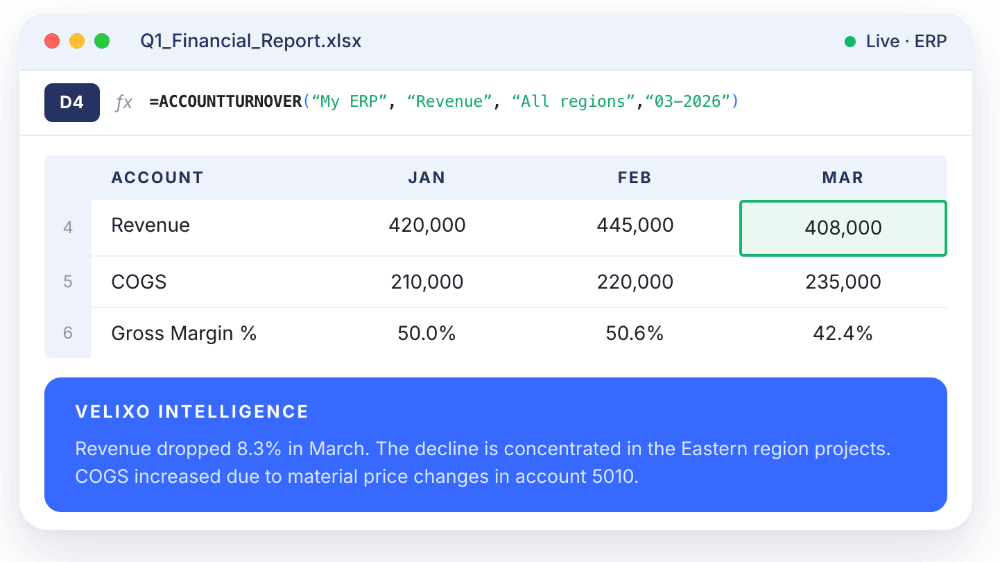
Ask your numbers a question in plain English. Velixo answers in the cell next to the number, with the source range highlighted. Explain a variance. Build a formula. Find why a query returns zero rows.
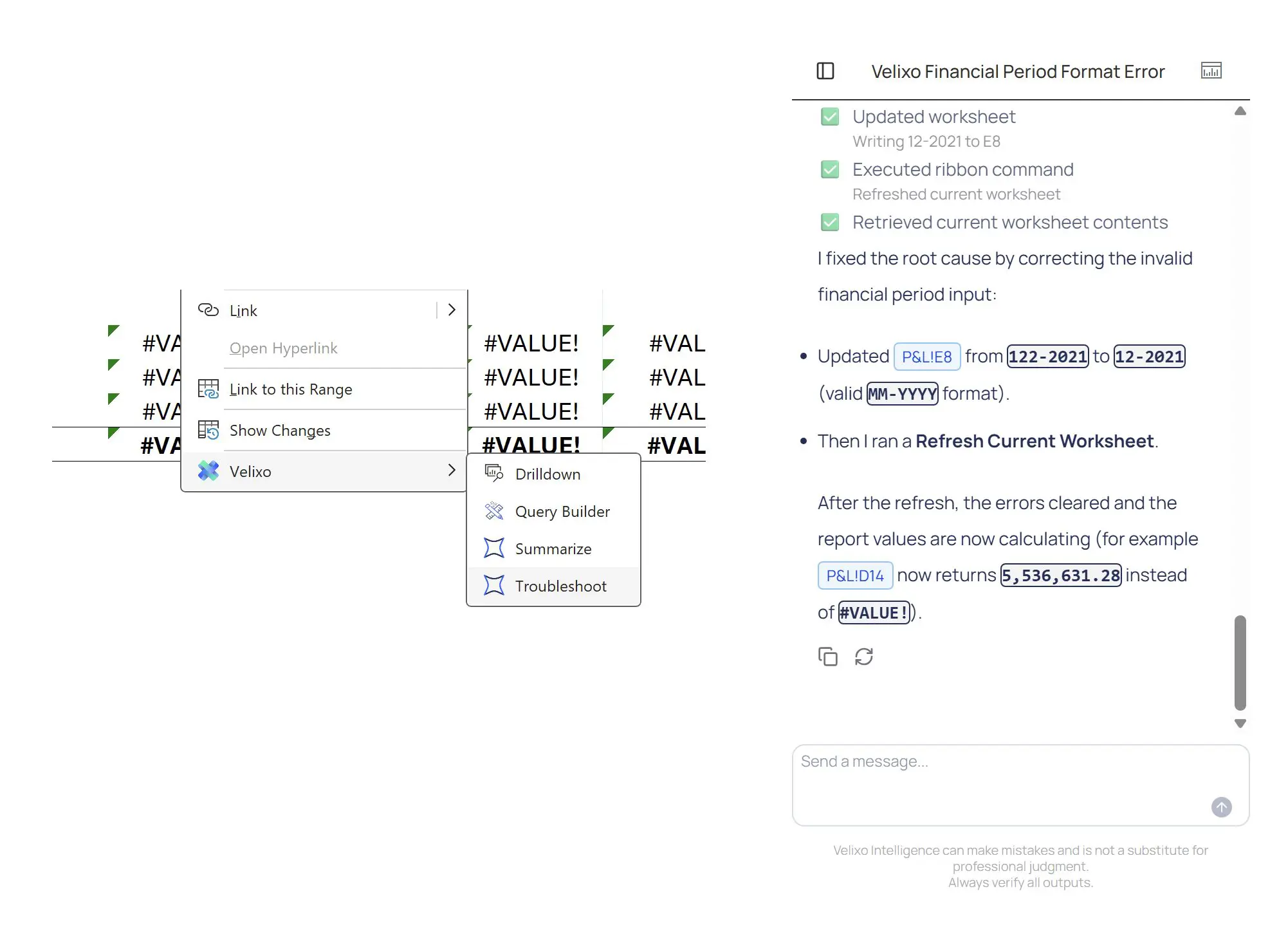
Stuck on a formula? Ask.
Type the question. Get the answer with the source — the function, the argument, the doc page, the GL field — in the side panel next to your sheet.
- Why is =ACCOUNTENDINGBALANCE(“4000-100”, TODAY()) returning #VALUE!?
- How do I pull AR invoices aged 60+ days, by customer, for the East region?
- What does the Branch argument do in this query, and why does my filter return zero rows?
Need the fix applied, not just explained? Velixo Intelligence can edit the formula for you. You approve. It writes.
Watch a short demo:
Powered by the Guide skill.

What happened this month? Ask.
Highlight any range. Ask what’s in it. The Analyst reads your sheet — your headers, your formulas, your dimensions — and answers grounded in the actual values, with the cells it used cited in the response.
The answer lands in the side panel, in a cell, or as a formula written to the sheet — your call. No data leaves Excel. No screenshots, no copy-paste into a chatbot.
Powered by the Analyst skill.
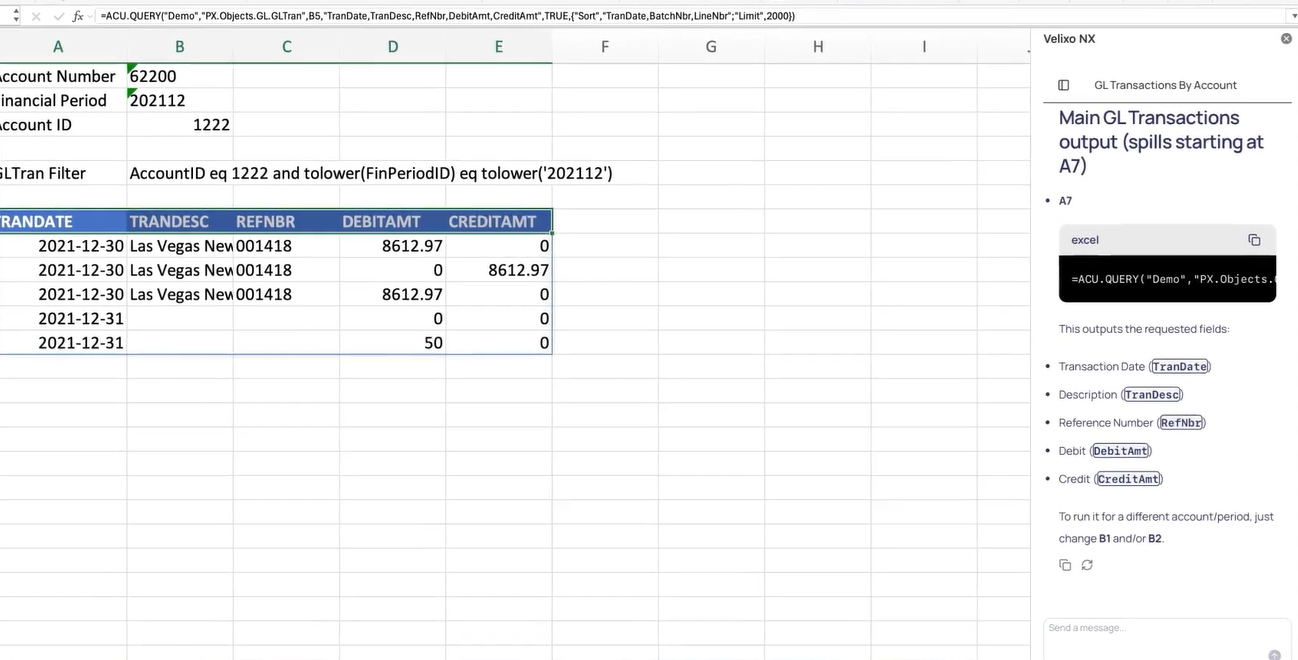
Build me a report that pulls GL transactions for account 62200, period 12-2025
Type the request. The Report Builder writes the Velixo formulas, places the parameters in the cells you’d expect to find them, and pulls the rows. You get a real report you can edit, version, and ship — not a static export, not a one-off answer.
Works for the analyst building from scratch. Works for the consultant inheriting a workbook with 400 formulas and no documentation. The output is a Velixo formula either of them can defend at audit.
Powered by the Report Builder skill.
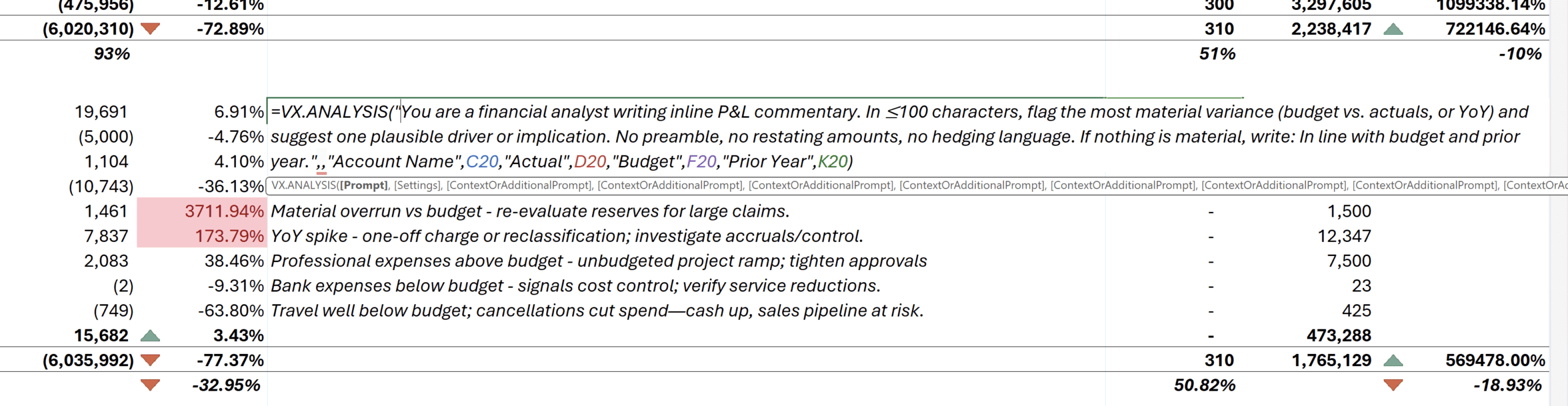
The commentary lives in the cell. Not the sidebar.
=VX.ASK() writes the explanation in the column next to the number it’s explaining. Refresh the workbook — the commentary refreshes too. Email the file to the board — the commentary travels with it. Send it to audit — the commentary cites the source rows.
Watch VX.ASK() explain a variance
The function competitors can’t write — because their commentary doesn’t live in the workbook.
Stuck on a formula? Ask.
Type the question. Get the answer with the source — the function, the argument, the doc page, the GL field — in the side panel next to your sheet.
- Why is =ACCOUNTENDINGBALANCE(“4000-100”, TODAY()) returning #VALUE!?
- How do I pull AR invoices aged 60+ days, by customer, for the East region?
- What does the Branch argument do in this query, and why does my filter return zero rows?
Need the fix applied, not just explained? Velixo Intelligence can edit the formula for you. You approve. It writes.
Watch a short demo:
Powered by the Guide skill.
What happened this month? Ask.
Highlight any range. Ask what’s in it. The Analyst reads your sheet — your headers, your formulas, your dimensions — and answers grounded in the actual values, with the cells it used cited in the response.
The answer lands in the side panel, in a cell, or as a formula written to the sheet — your call. No data leaves Excel. No screenshots, no copy-paste into a chatbot.
Powered by the Analyst skill.
Build me a report that pulls GL transactions for account 62200, period 12-2025
Type the request. The Report Builder writes the Velixo formulas, places the parameters in the cells you’d expect to find them, and pulls the rows. You get a real report you can edit, version, and ship — not a static export, not a one-off answer.
Works for the analyst building from scratch. Works for the consultant inheriting a workbook with 400 formulas and no documentation. The output is a Velixo formula either of them can defend at audit.
Powered by the Report Builder skill.
The commentary lives in the cell. Not the sidebar.
=VX.ASK() writes the explanation in the column next to the number it’s explaining. Refresh the workbook — the commentary refreshes too. Email the file to the board — the commentary travels with it. Send it to audit — the commentary cites the source rows.
Watch VX.ASK() explain a variance
The function competitors can’t write — because their commentary doesn’t live in the workbook.
The reliable one.
Victor isn't short on intelligence. He's short on hands.
Eighteen years in finance. A team of three and a nine-day close. His judgment was never the problem. The problem is that someone still pulls the aging report every Monday and checks the same fifteen things every close. 45 minutes of gathering for 10 minutes of judgment.
Velixo flips that ratio. The assembly runs itself.
The decisions stay his.
Without velixo
Month-end then.
Month-end now.
One workflow. Eleven days and an all-nighter, or an afternoon.
The eleven-day month-end.
- Export from the ERP late in the day.
- Reformat until the columns line up.
- Pivot, refresh, pivot again.
- Re-export when the board wants a different cut.
- Reconcile once more before sign-off.
- Ship a number that's already a version behind.
The 4-hour month-end close.
- Open the workbook. Every cell is live.
- Push the accruals back to the ERP from the sheet.
- Velixo Intelligence flags the exceptions. You ask why.
- The analyst agent writes the variance commentary. VX.ASK refreshes it.
- Done by lunch.
Customer success stories
Real customers. Real time saved.
Finance teams using Velixo save hours every week on reporting and close.
24 to 32 hours saved across 6 project managers, every month with the Cost to Complete report alone. And now I also get all my data from them on time.

Sage Intacct is a better ERP system, but we were lacking the export of formulas to Excel. With Velixo, it was a plug-and-play experience for our existing reports and it’s instant. It saves 2-3 hours every time I hit the refresh button.

Velixo cut Mid-States Companies’ estimate and proposal manhours in half. If you don’t have Velixo, you’re crazy.

Accounting systems are great, but the hardest part sometimes is getting the data out. If you know Excel, Velixo is an easy tool to learn. I’ve created great WIP schedules, import templates, and full financial packages. Best thing is, I’m not a professional report writer and I was able to do it!

This is the heart of all financial reporting and project management cost reporting for our Operations team. Velixo is what makes Acumatica WORK for us.

Preparing my board management report went from six hours to one hour, and I can probably save an extra 30 minutes with further Velixo automations.

We have cut our financial report generation process down to minutes and not hours. We can turn around ad-hoc financial requests instantaneously. It has made our process fast, lean and more transparent.

The ability to write my forecasts back in bulk saves me lots of back and forth and manual entries, I estimate it reduces our budgeting process from days to hours.

Velixo Reports has drastically reduced the amount of time it takes for my month-end financial statement preparation. I couldn’t be happier. Excellent product.

Integrating our Excel-based custom forms to Velixo Writeback completely automated manual entry for us. It’s probably days of work saved at the end of the month.

Velixo gives Acumatica users Superpowers! Everyone knows Excel. If you know Excel, it's so easy to learn Velixo and utilize all the data accumulated within your ERP to design Excel-based reports to make everyone's job easier.

It was an easy decision to utilize an excellent, well-developed, well-maintained tool on the market than to attempt other paths. Velixo had the right features, functionality, and ease of use to make it an easy decision for any business.

3,400 teams. 25 countries. 97% stay.
Best-selling app on Acumatica, Sage, and MYOB. G2 Momentum Leader.
finance and operations leaders trust Velixo
of cells refreshed daily
across 292 G2 reviews